Developers

Add calling, texting and voicemail to your product

Start with drop-in UI and go as low-level as you need: embeddable Building Blocks, a REST API with signed webhooks, and working open-source code on GitHub.

MIT-licensed examples in Node.js, Python and C#.

700+ integrations, built into every account

Twilio
HubSpot
Salesforce
Shopify
Slack
Microsoft Teams
Pipedrive
Google Calendar
Klaviyo
22,000+
Businesses since 2017
700+
Integrations
3
Languages of working examples
MIT
Open-source Starter CRM

Easy mode: Building Blocks

A dialer, inbox and contacts in your app with one script tag

Your server mints a short-lived token. The browser loads the Dock. Your users get calling, texting and a shared inbox inside your product, styled to match it.

  • Softphone, shared inbox, contacts, pipeline and phone number panes
  • Texting registration (10DLC) forms you do not have to build
  • Your branding, your login, your users
Explore Building Blocks
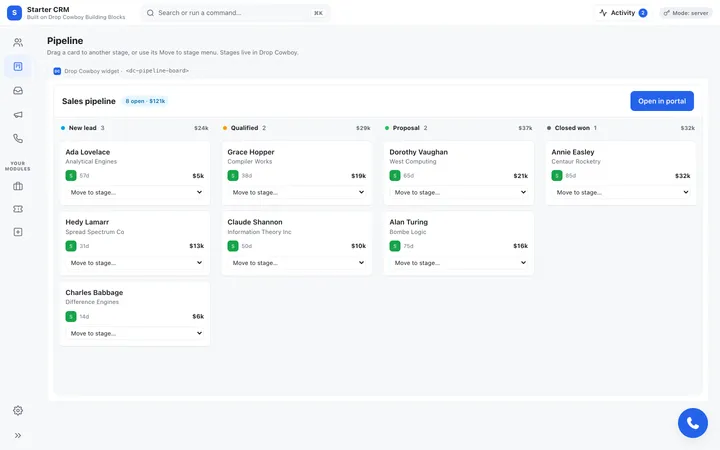
The pipeline board Building Block inside the Starter CRM: contacts in New lead, Qualified, Proposal and Closed won columns, with a deal value on each card
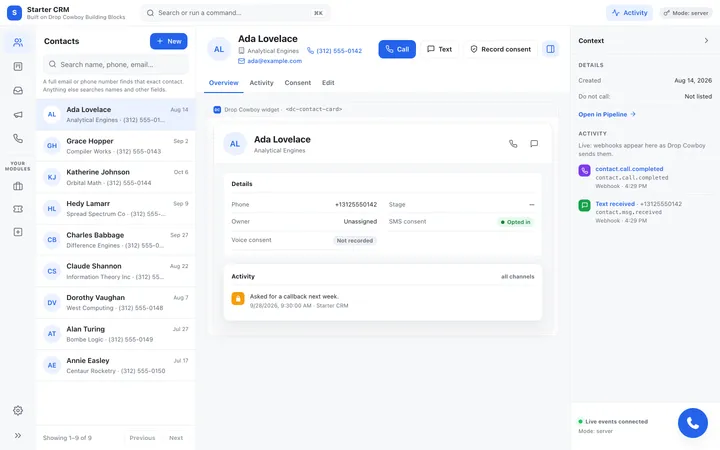
A contact's page in the Starter CRM: the contact list, the contact card with Call, Text and Record consent buttons, and live webhook activity

Open source on GitHub

Start from a CRM that already works

Copy the Starter CRM and make it yours. Contacts, pipeline, inbox, campaigns and phone pages, built on Building Blocks, with a Node.js or Python server you can read in an afternoon.

  • Three ways to build, side by side: the headless Contacts API, the Dock and web components
  • Token minting done right: your API secret stays on your server
  • A React 19 front-end and a no-build one, with the same pages
  • MIT licensed. Copy what you need
See the Starter CRM

Send your first ringless voicemail in five minutes

Clone the repo, add your API key and your own number, and run one file. The same recipe ships in Node.js, Python and C#.

Quickstart
# Node.js 20 or newer. Nothing to install.
git clone https://github.com/Drop-Cowboy/dropcowboy.git
cd dropcowboy/examples/api/quickstart
cp .env.example .env

# In .env, fill in DC_KEY, DC_SECRET, DC_TO (your own number)
# and DC_AUDIO_FILE (the path to an .mp3 or .wav). Then:
node quickstart.js
curl
curl -X POST https://api-v2.dropcowboy.com/rvm \
  -H "x-key: $DC_KEY" -H "x-secret: $DC_SECRET" \
  -H "Content-Type: application/json" \
  -d '{
    "to": "+13125550142",
    "phone_line_id": "e2b6f9a3-5c1d-4e8b-a4f7-9c3e1b5d7a28",
    "media_id": "1b7e3c9a-4d2f-4a8b-9e6c-7f2a1d5b3c80",
    "foreign_id": "order-1042"
  }'
Python
# Python 3.9 or newer. Run from the folder you cloned into.
cd dropcowboy/examples/api/python
python3 -m venv .venv
source .venv/bin/activate
pip install -r requirements.txt
cp .env.example .env

# In .env, set DC_KEY, DC_SECRET and DC_TO. Then send one voicemail
# from a phone line on your account and wait for the result:
python -m dropcowboy_examples.recipes.send_rvm_retail
C#
# The .NET 8 SDK. Run from the folder you cloned into.
cd dropcowboy/examples/api/csharp/src/DropCowboy.Examples
export DC_KEY="your-key"
export DC_SECRET="your-secret"
export DC_TO="+13125550142"

# Send one voicemail from a phone line on your account:
dotnet run -- retail
Building Blocks token
// Your server. Browser code never sees KEY/SECRET. The key needs numbers:write.
app.post('/dropcowboy/token', async function (req, res) {
  const r = await fetch('https://api-v2.dropcowboy.com/phone/public/embed/token', {
    method: 'POST',
    headers: {
      'x-key': process.env.DC_KEY,
      'x-secret': process.env.DC_SECRET,
      'Content-Type': 'application/json'
    },
    body: JSON.stringify({ site_id: process.env.DC_SITE_ID, scope: ['dialer:webrtc', 'contacts'], ttl_seconds: 900 })
  });
  res.status(r.status).json(await r.json());
});

Which one fits your project?

Every option runs on the same account, numbers and compliance checks, so you can mix them.

Building BlocksREST API and webhooksAutomationAI tools (MCP)
You writeA token endpoint and one script tagHTTPS calls from your serverNothing: visual flowsPrompts in your editor
UI includedDialer, inbox, contactsBring your ownDashboardBring your own
Best forSaaS adding calling and textingBackends sending at volumeOps and marketing teamsPrototypes and internal tools
Start fromStarter CRM on GitHubQuickstart on GitHub700+ integrationsAgent skills on GitHub

From signup to first result

  1. Create an API key

    In the dashboard, open Developers and create a key pair. Send it as the x-key and x-secret headers.

  2. Add yourself as a test number

    Add your own number on the Dialing rules page. Test numbers skip the contact frequency limit while you build.

  3. Run the quickstart

    It sends one ringless voicemail to your number and prints the result when it arrives.

Developer questions

How do I authenticate?
Send your API key pair as the x-key and x-secret headers on every request to https://api-v2.dropcowboy.com. Server-to-server integrations can instead use OAuth 2.0 client credentials: exchange a client id and secret at https://login.dropcowboy.com/oauth/token for a bearer token.
Does a 202 mean my message was delivered?
No. A 202 means the send was accepted. Compliance checks run after that, and the result arrives on the status webhook for the channel, with a reason_code that explains any failure.
What happens outside calling hours?
Voice sends (ringless voicemail, voice broadcast, AI calls) are held and retried for up to 3 days, then fail with tcpa_expired. There is no webhook until the send goes out. Texts sent outside the contact's window (federal and state-specific calling hours in their time zone) fail with reason_code 4011 and are not retried, so resend them inside the window. To drop to your own phones after hours, add them as test numbers on the Dialing rules page and turn on Allow Test Numbers to Bypass TCPA Hours. Always consult with your legal counsel to confirm compliance procedures for your specific use case.
Can I use the GitHub code in my own product?
Yes. The Starter CRM, the API examples and the agent skills are MIT licensed. Copy them, change them and ship them. Keep your API secret on your server, never in a web page or a phone app.

Build it this week

Get an API key and send your first voicemail today, or talk to us about embedding Drop Cowboy in your platform.